
Reporting a problem with your order
Something missing, cold, late: tell us what happened in two taps. If an item was missing, you mark which one and, when enabled, only that value is refunded.
How it works
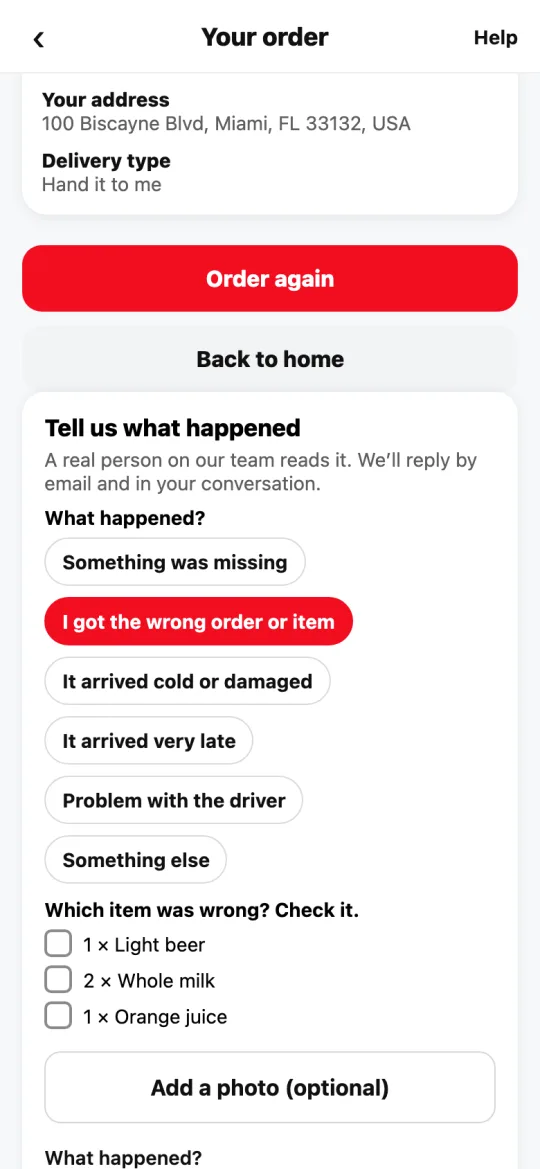
In the order, tap “I have a problem”. Choose what happened: something missing, wrong order, cold or damaged, very late, problem with the driver, or something else.
If something was missing, wrong or damaged, check those items. Divoox calculates what they’re worth; if automatic refunds are on in your city, that amount goes back to your card in a few days; if not, a person on the team reviews it and replies by email.
If an item was wrong or damaged, you can add a photo. Only you and our support team can see it.
The automatic refund is given once per order. If you report something else on the same order, a person reviews it.
Your report stays in a private conversation with a link that reaches you by email.
Steps
- Open the order and tap “I have a problem”.
- Choose the reason and check the items that were missing, wrong or damaged.
- If you want, add a photo of the item.
- Add anything you want and send.
This guide answers
- An item was missing, what do I do?
- Do I get a refund if something is missing?
- I got a wrong or damaged item, what do I do?