
Rate the food and the driver
Two separate ratings. If the food was late, it’s not the driver’s fault.
How it works
Your food rating counts toward the restaurant’s average. Once a restaurant has 10 or more ratings, everyone sees its stars and number of ratings in the list and on its page, along with the latest comments and the restaurant’s replies. Only your first name is shown.
With fewer than 10 ratings, the restaurant shows as “New”. Only ratings from real Divoox orders count.
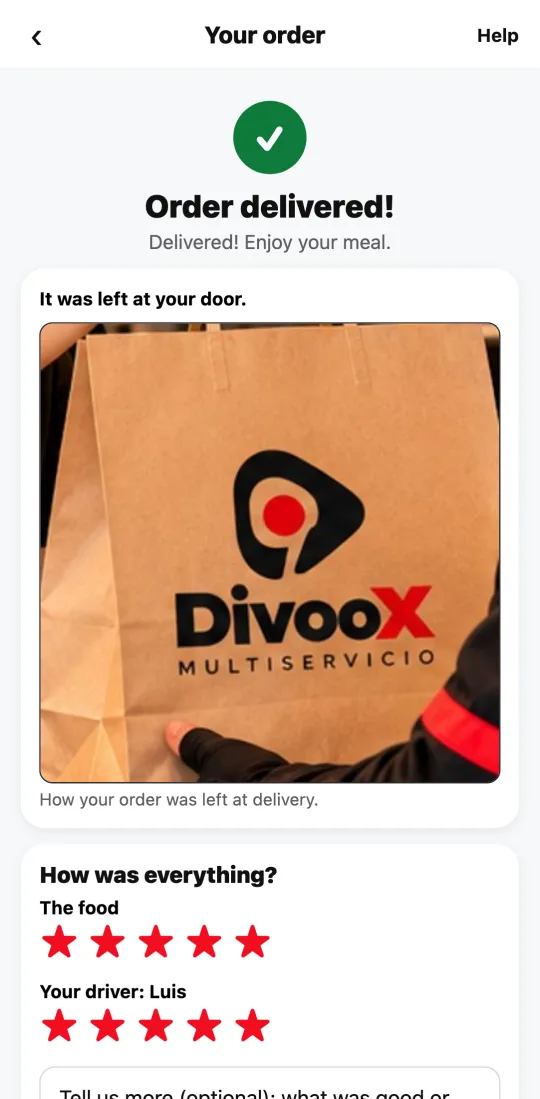
Steps
- When the order arrives, the order screen shows “How was everything?”
- Rate the food (the restaurant) and your driver separately, with stars.
- If you give the driver a low rating but the problem was the food or the restaurant’s delay, flip the switch: the rating won’t count against them.
- Tap “Send rating.” Thanks: it makes delivery better for everyone.
This guide answers
- How do I rate the food and the driver?
- What if the food was late because of the restaurant?