
Verify your identity
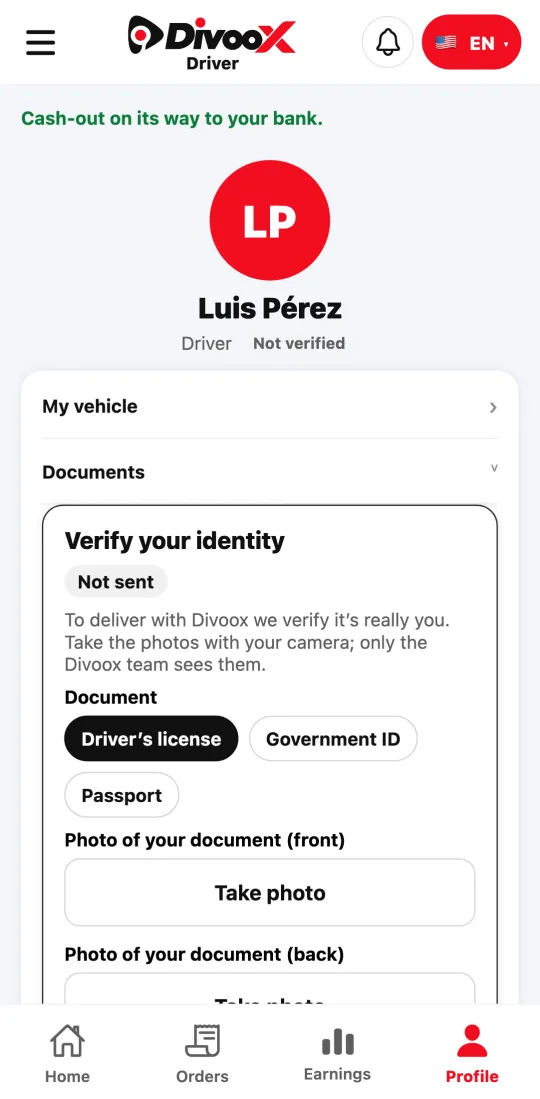
Your ID and a photo of your face, right from the app. It’s what gives customers peace of mind when they open the door.
How it works
When customers get their food, they want to know the person at their door is who they say they are. That’s why every Divoox driver goes through an identity check before delivering.
All you need is your ID and a photo of your face. Only the Divoox team that reviews verifications sees your ID; it’s never published and it’s deleted if you close your account.
Once approved, the photo of your face is your profile photo: our team compares it with your ID, and the customer of the order you’re carrying sees it, so they know who’s at their door. No one else sees it. Since it’s your verified photo, you can’t change it from the app; if you need a new one, contact us and we’ll review it again.
Steps
- Open the driver app, tap the menu at the top left, and go to “My details and vehicle.”
- Under “Verify your identity,” choose your document: driver’s license, government ID, or passport.
- Take the photo of the front and the back (a passport only needs the front). Make sure the details are readable, with no glare.
- Take the photo of your face: straight on, in good light, no cap or sunglasses.
- Tap “Send for review.” We email you when it’s approved, or tell you which photo to retake.
This guide answers
- How do I verify my identity?